Step 9: Complete Integration
Live Demo: html/cog_map_step_09.html
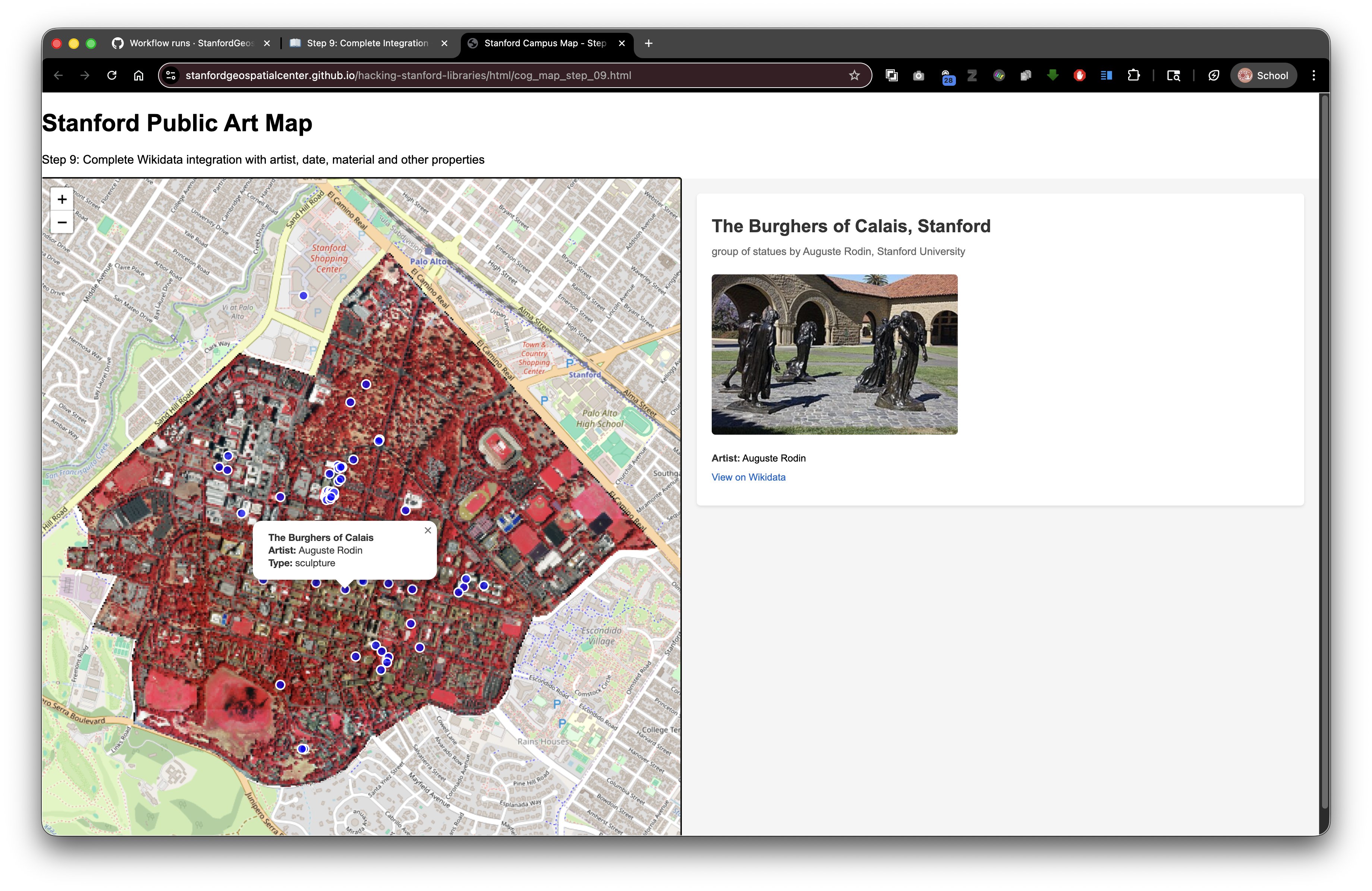
Overview
In this final step, we'll create a fully-featured application by adding multiple Wikidata properties: artist names, creation dates, materials, and more. This demonstrates how to build a comprehensive information display from structured data.
Learning Objectives
- Extract multiple properties from Wikidata entities
- Create reusable helper functions for different data types
- Handle entity references (links to other Wikidata items)
- Format dates and complex data for display
- Build rich, multi-faceted information panels
- Understand Wikidata's linked data structure
Common Wikidata Properties for Artworks
| Property | ID | Data Type | Example |
|---|---|---|---|
| Image | P18 | File | "Sculpture_photo.jpg" |
| Creator | P170 | Item (person) | Mark di Suvero (Q315277) |
| Discoverer or inventor | P61 | Item (person) | George Segal (Q500837) |
| Inception | P571 | Date | 1980 |
| Material | P186 | Item | Bronze (Q34095) |
| Location | P276 | Item | Stanford University (Q5083) |
| Genre | P136 | Item | Public art (Q557141) |
| Height | P2048 | Quantity | 4.5 meters |
| Width | P2049 | Quantity | 3 meters |
Understanding item references:
- Properties like P170 (creator) don't store the name directly
- They store a reference to another Wikidata item
- We need to fetch that item to get the label (name)
- This is called "linked data"
The Complete Code
<!DOCTYPE html>
<html lang="en">
<head>
<base target="_top">
<meta charset="utf-8">
<meta name="viewport" content="width=device-width, initial-scale=1">
<title>Stanford Campus Map - Step 9: Complete Wikidata Integration</title>
<link rel="stylesheet" href="https://unpkg.com/leaflet@1.9.4/dist/leaflet.css" integrity="sha256-p4NxAoJBhIIN+hmNHrzRCf9tD/miZyoHS5obTRR9BMY=" crossorigin=""/>
<script src="https://unpkg.com/leaflet@1.9.4/dist/leaflet.js" integrity="sha256-20nQCchB9co0qIjJZRGuk2/Z9VM+kNiyxNV1lvTlZBo=" crossorigin=""></script>
<script src="https://unpkg.com/proj4"></script>
<script src="https://unpkg.com/georaster"></script>
<script src="https://unpkg.com/georaster-layer-for-leaflet"></script>
<link rel="stylesheet" href="styles_wikidata.css">
</head>
<body>
<h1>Stanford Public Art Map</h1>
<p>Step 9: Complete integration with all Wikidata properties</p>
<div id="container">
<div id="mapWrapper">
<div id="map"></div>
</div>
<div id="wikidata-panel">
<div id="no-selection">Click on an artwork to see Wikidata information</div>
</div>
</div>
<script>
const map = L.map('map').setView([37.427, -122.169], 15);
const tiles = L.tileLayer('https://tile.openstreetmap.org/{z}/{x}/{y}.png', {
maxZoom: 19,
attribution: '© <a href="http://www.openstreetmap.org/copyright">OpenStreetMap</a>'
}).addTo(map);
// Helper function to fetch a label for a Wikidata item
async function getWikidataLabel(itemId) {
try {
const response = await fetch(`https://www.wikidata.org/wiki/Special:EntityData/${itemId}.json`);
const data = await response.json();
const entity = data.entities[itemId];
// Return English label if available, otherwise return the item ID
return entity.labels.en ? entity.labels.en.value : itemId;
} catch (error) {
console.error(`Error fetching label for ${itemId}:`, error);
return itemId;
}
}
// Helper function to get the image URL from Wikidata entity
function getWikidataImage(entity) {
// Check if the entity has any claims (properties)
if (!entity.claims) return null;
// Look for property P18 (image)
const imageClaims = entity.claims.P18;
// Check if P18 exists and has values
if (!imageClaims || imageClaims.length === 0) return null;
// Get the first image filename from the claims
const imageFilename = imageClaims[0].mainsnak.datavalue.value;
// Construct the Wikimedia Commons URL
return `https://commons.wikimedia.org/wiki/Special:FilePath/${encodeURIComponent(imageFilename)}`;
}
// Function to fetch and display complete Wikidata content
async function displayWikidataInfo(wikidataId) {
const panel = document.getElementById('wikidata-panel');
try {
// Fetch the Wikidata entity in JSON format
const response = await fetch(`https://www.wikidata.org/wiki/Special:EntityData/${wikidataId}.json`);
const data = await response.json();
const entity = data.entities[wikidataId];
// Check if entity was found
if (!entity) {
panel.innerHTML = '<div id="no-selection">Wikidata not found</div>';
return;
}
// Begin building the HTML content
let html = '<div class="wikidata-content">';
// Get and display the image if available
const imageUrl = getWikidataImage(entity);
if (imageUrl) {
html += `<img src="${imageUrl}" alt="Artwork image" class="wikidata-image">`;
}
// Extract and display the label (name)
const label = entity.labels.en ? entity.labels.en.value : wikidataId;
html += `<div class="wikidata-label">${label}</div>`;
// Extract and display the description
if (entity.descriptions.en) {
html += `<div class="wikidata-description">${entity.descriptions.en.value}</div>`;
}
// Extract and display the creator (P170)
if (entity.claims.P170) {
const creatorId = entity.claims.P170[0].mainsnak.datavalue.value.id;
const creatorName = await getWikidataLabel(creatorId);
html += `<div class="wikidata-property"><strong>Creator:</strong> <a href="https://www.wikidata.org/wiki/${creatorId}" target="_blank">${creatorName}</a></div>`;
}
// Extract and display the discoverer or inventor (P61) - used for some sculptures
if (entity.claims.P61) {
const inventorId = entity.claims.P61[0].mainsnak.datavalue.value.id;
const inventorName = await getWikidataLabel(inventorId);
html += `<div class="wikidata-property"><strong>Artist:</strong> <a href="https://www.wikidata.org/wiki/${inventorId}" target="_blank">${inventorName}</a></div>`;
}
// Extract and display inception date (P571)
if (entity.claims.P571) {
const dateValue = entity.claims.P571[0].mainsnak.datavalue.value.time;
// Wikidata dates are in format: +1980-01-01T00:00:00Z
// Extract the year
const year = dateValue.match(/[+-](\d{4})/)[1];
html += `<div class="wikidata-property"><strong>Date:</strong> ${year}</div>`;
}
// Extract and display material (P186)
if (entity.claims.P186) {
const materials = [];
// Loop through all materials (there might be multiple)
for (let claim of entity.claims.P186) {
const materialId = claim.mainsnak.datavalue.value.id;
const materialName = await getWikidataLabel(materialId);
materials.push(`<a href="https://www.wikidata.org/wiki/${materialId}" target="_blank">${materialName}</a>`);
}
html += `<div class="wikidata-property"><strong>Material:</strong> ${materials.join(', ')}</div>`;
}
// Link to view the full Wikidata page
html += `<div class="wikidata-property"><a href="https://www.wikidata.org/wiki/${wikidataId}" target="_blank" class="wikidata-link">View on Wikidata</a></div>`;
// Close the div and update the panel
html += '</div>';
panel.innerHTML = html;
} catch (error) {
console.error('Error fetching Wikidata:', error);
panel.innerHTML = '<div id="no-selection">Error loading Wikidata information</div>';
}
}
var url_to_geotiff_file = new URL("collection/stanford_campus_irg.tif", window.location.href).href;
parseGeoraster(url_to_geotiff_file).then(georaster => {
console.log("georaster:", georaster);
fetch("collection/stanford_campus.geojson")
.then(r => r.json())
.then(maskGeojson => {
var layer = new GeoRasterLayer({
attribution: "Planet",
georaster: georaster,
resolution: 128,
mask: maskGeojson
});
layer.addTo(map);
map.fitBounds(layer.getBounds());
});
}).catch(console.error);
fetch('collection/stanford_public_art.geojson')
.then(response => response.json())
.then(data => {
const artworkLayer = L.geoJSON(data, {
pointToLayer: function(feature, latlng) {
return L.circleMarker(latlng, {
radius: 6,
color: 'white',
weight: 2,
fillColor: 'blue',
fillOpacity: 0.7
});
},
onEachFeature: function(feature, layer) {
const props = feature.properties || {};
const title = props.name || 'Artwork';
const artist = props.artist_name;
const type = props.artwork_type;
let popupContent = '<div style="min-width:200px;">';
popupContent += '<b>' + title + '</b><br>';
if (artist) popupContent += '<b>Artist:</b> ' + artist + '<br>';
if (type) popupContent += '<b>Type:</b> ' + type;
popupContent += '</div>';
layer.bindPopup(popupContent);
// Add click handler to display Wikidata info
layer.on('click', function() {
if (props.wikidata) {
displayWikidataInfo(props.wikidata);
} else {
document.getElementById('wikidata-panel').innerHTML = '<div id="no-selection">No Wikidata ID available for this artwork</div>';
}
});
}
}).addTo(map);
map.fitBounds(artworkLayer.getBounds());
})
.catch(error => console.error('Error loading GeoJSON:', error));
</script>
</body>
</html>
What's New?
1. The getWikidataLabel() Helper Function
async function getWikidataLabel(itemId) {
    try {
        const response = await fetch(`https://www.wikidata.org/wiki/Special:EntityData/${itemId}.json`);
        const data = await response.json();
        const entity = data.entities[itemId];

        return entity.labels.en ? entity.labels.en.value : itemId;
    } catch (error) {
        console.error(`Error fetching label for ${itemId}:`, error);
        return itemId;
    }
}
Why do we need this?
When we access properties like P170 (creator), we get a reference to another item, not the name:
// We get this:
{
  "datavalue": {
    "value": {
      "id": "Q315277"
    }
  }
}

// But we want this:
"Mark di Suvero"
This helper:
- Takes a Wikidata item ID (like "Q315277")
- Fetches that item's data
- Extracts the English label
- Returns the human-readable name
It's async because it makes a network request.
2. Linked Data and Entity References
Wikidata uses linked data - items link to other items:
"Gay Liberation" (Q16270988)
    ↓
    P170 (creator)
    ↓
    George Segal (Q500837)
In the JSON:
entity.claims.P170[0].mainsnak.datavalue.value.id
// Returns: "Q500837"
To get the name, we fetch Q500837:
const creatorName = await getWikidataLabel("Q500837");
// Returns: "George Segal"
3. Extracting Creator Information (P170)
if (entity.claims.P170) {
    const creatorId = entity.claims.P170[0].mainsnak.datavalue.value.id;
    const creatorName = await getWikidataLabel(creatorId);
    html += `<div class="wikidata-property"><strong>Creator:</strong> <a href="https://www.wikidata.org/wiki/${creatorId}" target="_blank">${creatorName}</a></div>`;
}
Step by step:
- Check if P170 exists
- Extract the item ID from the first claim
- Fetch the label for that item ID
- Build HTML with the name and a link to the creator's Wikidata page
Why await? The getWikidataLabel() function is asynchronous - it needs to fetch data from the API.
4. Handling Multiple Properties (P61)
if (entity.claims.P61) {
    const inventorId = entity.claims.P61[0].mainsnak.datavalue.value.id;
    const inventorName = await getWikidataLabel(inventorId);
    html += `<div class="wikidata-property"><strong>Artist:</strong> <a href="https://www.wikidata.org/wiki/${inventorId}" target="_blank">${inventorName}</a></div>`;
}
Why check for P61? Different items use different properties:
- P170 = Creator (general)
- P61 = Discoverer or inventor (sometimes used for sculptures)
Some artworks use one, some use the other, some use both.
5. Date Extraction and Formatting (P571)
if (entity.claims.P571) {
    const dateValue = entity.claims.P571[0].mainsnak.datavalue.value.time;
    const year = dateValue.match(/[+-](\d{4})/)[1];
    html += `<div class="wikidata-property"><strong>Date:</strong> ${year}</div>`;
}
Wikidata date format:
"+1980-01-01T00:00:00Z"
Components:
+or-= BCE/CE1980= Year01-01= Month and dayT00:00:00Z= Time (usually 00:00:00 for dates)
Using regex to extract the year:
dateValue.match(/[+-](\d{4})/)
Breakdown:
/[+-]= Match + or -(\d{4})= Capture 4 digits (the year)[1]= Get the first capture group (the year)
Why just the year? Often that's all we need, and it's simpler to display.
More complex date handling:
// Extract full date
const dateMatch = dateValue.match(/([+-])(\d{4})-(\d{2})-(\d{2})/);
const era = dateMatch[1] === '+' ? 'CE' : 'BCE';
const year = dateMatch[2];
const month = dateMatch[3];
const day = dateMatch[4];

html += `<div><strong>Date:</strong> ${year}-${month}-${day} ${era}</div>`;
6. Handling Multiple Values (Materials)
if (entity.claims.P186) {
    const materials = [];
    for (let claim of entity.claims.P186) {
        const materialId = claim.mainsnak.datavalue.value.id;
        const materialName = await getWikidataLabel(materialId);
        materials.push(`<a href="https://www.wikidata.org/wiki/${materialId}" target="_blank">${materialName}</a>`);
    }
    html += `<div class="wikidata-property"><strong>Material:</strong> ${materials.join(', ')}</div>`;
}
Why loop? An artwork can be made from multiple materials:
- Bronze
- Steel
- Paint
- Wood
The process:
- Create an empty array:
materials = [] - Loop through all P186 claims
- For each claim, get the material ID
- Fetch the label for that material
- Create an HTML link and add to array
- Join all materials with commas
Result:
<div><strong>Material:</strong> <a href="...">Bronze</a>, <a href="...">Steel</a></div>
Understanding await in a loop:
for (let claim of entity.claims.P186) {
    const materialName = await getWikidataLabel(materialId);  // Waits for each request
    materials.push(...);
}
Important: Each await pauses until the request completes. With many materials, this could be slow. For better performance, use Promise.all():
const materialPromises = entity.claims.P186.map(claim =>
    getWikidataLabel(claim.mainsnak.datavalue.value.id)
);
const materialNames = await Promise.all(materialPromises);  // Fetch all at once!
7. Building Rich HTML Content
html += `<div class="wikidata-property"><strong>Creator:</strong> <a href="..." target="_blank">${creatorName}</a></div>`;
Template literals make it easy to build complex HTML:
Components:
<strong>Creator:</strong>- Bold label<a href="..." target="_blank">- Link that opens in new tab${creatorName}- Variable interpolation</a></div>- Close tags
Result (when rendered):
Creator: Mark di Suvero
Understanding Wikidata's Data Structure
Anatomy of a claim:
{
  "mainsnak": {
    "snaktype": "value",
    "property": "P170",
    "datatype": "wikibase-item",
    "datavalue": {
      "value": {
        "entity-type": "item",
        "numeric-id": 315277,
        "id": "Q315277"
      },
      "type": "wikibase-entityid"
    }
  }
}
Path to extract the ID:
claim.mainsnak.datavalue.value.id
Different data types:
Item reference (P170, P186):
value.id // "Q315277"
String (P1476 - title):
value // "Gay Liberation"
Time (P571 - inception):
value.time // "+1980-01-01T00:00:00Z"
Quantity (P2048 - height):
value.amount  // "+4.5"
value.unit    // "http://www.wikidata.org/entity/Q11573"
Complete Data Flow Example
When user clicks on "Gay Liberation" sculpture:
- Click handler calls
displayWikidataInfo("Q16270988") - Fetch
https://www.wikidata.org/wiki/Special:EntityData/Q16270988.json - Parse JSON response
- Extract image (P18) → "Gay Liberation sculpture 04.jpg"
- Extract label → "Gay Liberation"
- Extract description → "sculpture by George Segal"
- Extract creator (P170) → "Q500837"
- Call
getWikidataLabel("Q500837") - Fetch
https://www.wikidata.org/wiki/Special:EntityData/Q500837.json - Parse JSON → "George Segal"
- Call
- Extract inception (P571) → "+1980-01-01T00:00:00Z" → "1980"
- Extract materials (P186) → ["Q34095"]
- Call
getWikidataLabel("Q34095") - Fetch and parse → "Bronze"
- Call
- Build HTML with all information
- Update panel with
innerHTML
Total API requests: 3-5 (depending on number of materials)
Performance Considerations
Multiple async requests:
// Sequential (slower)
const creator = await getWikidataLabel(creatorId);     // Wait
const material = await getWikidataLabel(materialId);   // Wait
// Total time: Request1 + Request2

// Parallel (faster)
const [creator, material] = await Promise.all([
    getWikidataLabel(creatorId),
    getWikidataLabel(materialId)
]);
// Total time: Max(Request1, Request2)
Caching labels:
const labelCache = {};

async function getWikidataLabel(itemId) {
    if (labelCache[itemId]) {
        return labelCache[itemId];  // Return cached value
    }

    // ... fetch logic ...

    labelCache[itemId] = label;  // Store in cache
    return label;
}
Try It Yourself
- Copy the complete code into
step-09.html - Ensure
styles_wikidata.cssexists - Open in your browser
- Click different artworks
You should now see comprehensive information about each artwork!
Experiments
Add more properties:
// Location (P276)
if (entity.claims.P276) {
    const locationId = entity.claims.P276[0].mainsnak.datavalue.value.id;
    const locationName = await getWikidataLabel(locationId);
    html += `<div><strong>Location:</strong> ${locationName}</div>`;
}

// Height (P2048)
if (entity.claims.P2048) {
    const height = entity.claims.P2048[0].mainsnak.datavalue.value.amount;
    const unit = entity.claims.P2048[0].mainsnak.datavalue.value.unit;
    html += `<div><strong>Height:</strong> ${height} meters</div>`;
}
Format dates differently:
const dateOptions = { year: 'numeric', month: 'long', day: 'numeric' };
const date = new Date(dateValue);
const formatted = date.toLocaleDateString('en-US', dateOptions);
// Result: "January 1, 1980"
Add loading indicators:
async function displayWikidataInfo(wikidataId) {
    const panel = document.getElementById('wikidata-panel');
    panel.innerHTML = '<div class="loading">Loading...</div>';

    // ... fetch and display code ...
}
Group properties by category:
html += '<h3>Basic Information</h3>';
// ... label, description ...

html += '<h3>Creator Information</h3>';
// ... creator, date ...

html += '<h3>Physical Properties</h3>';
// ... materials, dimensions ...
Connection to Digital Stacks
This complete application works seamlessly with SDR:
Your local project/
├── index.html (with all Wikidata integration)
├── styles_wikidata.css
└── collection/
    ├── stanford_campus_irg.tif
    ├── stanford_campus.geojson
    └── stanford_public_art.geojson

After SDR deposit → DRUID: abc123xyz456

Deployed at:
https://stacks.stanford.edu/file/druid:abc123xyz456/index.html

Works because:
✓ All local files use relative paths

**Related resources:**
- Stanford Digital Repository: https://sdr.stanford.edu/
- Stanford Libraries APIs: https://api.library.stanford.edu/
- Stanford Geospatial Center: https://gis.stanford.edu/
✓ External APIs (Wikidata, OpenStreetMap) use absolute URLs
✓ JavaScript executes client-side
✓ No server-side processing needed
Advantages of this approach:
- Data stays current (Wikidata updates automatically)
- Minimal deposit size (no duplicate data storage)
- Rich, linked information
- Works anywhere, including SDR
- No API keys required
Best Practices Demonstrated
- Modular code - Helper functions separate concerns
- Error handling -Try-catchprevents crashes
- Defensive programming - Check if data exists
- User feedback - Show loading states and errors
- Semantic HTML - Proper structure and classes
- Accessibility - Alt text, descriptive links
- Performance awareness - Async operations
- Code reusability - Same helpers work for any property
What's Next?
You now have a complete, working interactive map application that:
- Displays a custom map with COG imagery
- Shows artwork locations from GeoJSON
- Fetches rich data from Wikidata
- Displays images from Wikimedia Commons
- Presents comprehensive information in a clean layout
- Works perfectly when deployed to Stanford Digital Repository
Possible enhancements:
- Add search functionality
- Implement filtering by artist or date
- Create a gallery view
- Add image carousels for multiple images
- Integrate with other APIs (OpenStreetMap, Wikipedia)
- Add map layers for different datasets
- Create print-friendly views
- Add social sharing features
Deployment:
- Prepare your files (HTML, CSS, GeoJSON, GeoTIFF)
- Submit to SDR with appropriate metadata
- Receive your DRUID
- Share:
https://stacks.stanford.edu/file/druid:YOUR_DRUID/index.html
Key Takeaways
- Linked data connects related entities across a knowledge base
- Helper functions reduce code duplication and improve maintainability
- Async/await handles multiple dependent API calls cleanly
- Different properties require different data extraction strategies
- Regex is useful for parsing formatted strings like dates
- Looping with
awaitfetches data sequentially (consider Promise.all() for parallel) - Building rich, dynamic interfaces requires careful HTML construction
- External APIs enhance local data without bloating deposits
- Comprehensive applications can be built withclient-sideJavaScript
- SDR provides stable, long-term hosting for interactive web applications
Common Questions
Q: How do I find other Wikidata properties?
A: Browse an item on Wikidata.org, or check the Wikidata property list.
Q: Can I contribute to Wikidata?
A: Yes! Wikidata is open for anyone to edit. Create an account and start contributing.
Q: What if an item has no English label?
A: Modify getWikidataLabel() to fall back to other languages:
return entity.labels.en?.value || entity.labels.es?.value || entity.labels.fr?.value || itemId;
Q: Are there rate limits?
A: Wikidata is generous, but don't make hundreds of rapid requests. Consider caching.
Q: Can I edit Wikidata programmatically?
A: Yes, with authentication. See Wikidata API documentation.
Q: How do I handle items with incomplete data?
A: Use defensive checks (if (entity.claims.P170)) as shown in this tutorial.
Q: What about copyright for images?
A: Wikimedia Commons files have licenses. Check each file's license page for specific terms.
Previous: Step 8: Wikidata Images | Next: BONUS Step 10: Wikidata Filter | Workshop Materials: Index