Step 11: Future Proofing - Creating Self-Contained Deposits
Live Demo: html/cog_map_step_11.html
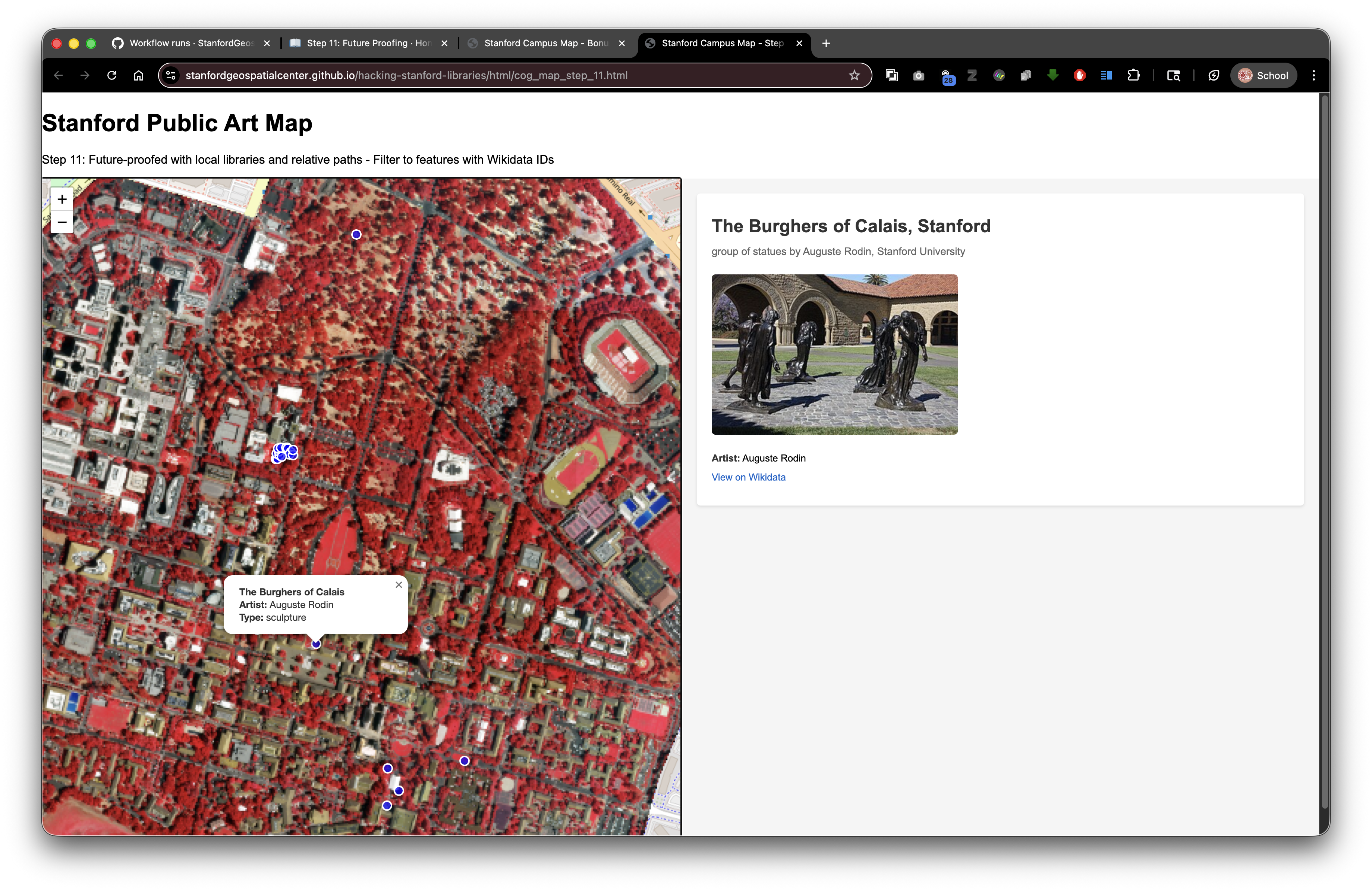
Overview
In this final step, we'll ensure your interactive web application remains fully functional in perpetuity by creating a self-contained deposit. Instead of relying on external CDNs that might change or disappear, we'll download and include local copies of all required JavaScript libraries with your deposit.
Learning Objectives
- Understand the risks of relying on external CDNs
- Download and store JavaScript libraries locally
- Update HTML to reference local library copies
- Create a self-contained, future-proof deposit structure
- Test the application with local libraries
- Understand relative path benefits for long-term preservation
Why Future Proofing Matters
When you deploy your application to the Stanford Digital Repository, you want it to work perfectly today, tomorrow, and decades from now.
The Problem with CDNs:
- Third-party services can change or disappear
- URLs might be deprecated
- Service availability isn't guaranteed forever
- Your application becomes dependent on external infrastructure
The Solution - Self-Contained Deposits:
- Store all dependencies locally in your SDR deposit
- Use relative paths so everything stays together
- Your application remains functional regardless of external service status
- Demonstrates best practices for digital preservation
What to Download
For the complete Stanford Public Art Map application, you need:
Leaflet Library (mapping)
- File:
leaflet.jsandleaflet.css - Source: https://unpkg.com/leaflet@1.9.4/dist/
- File:
Your Application CSS
- File:
styles_wikidata.css(already local)
- File:
Note on External Resources - Preservation vs. Function Trade-off:
You do NOT need to download Wikidata, Wikimedia Commons, or OpenStreetMap files. These external APIs continue to work regardless of your deposit location, and downloading copies would create legal/licensing issues.
However, this convenience comes with a trade-off: while external APIs enrich your application's functionality, they introduce a preservation risk. If those external services change their APIs, modify their data structure, or disappear entirely, your application may break or lose functionality—even though your SDR deposit itself remains intact.
Best practice: Only include external APIs for services that are well-established, widely-adopted infrastructure (like Wikidata and OpenStreetMap). For mission-critical data or specialized services, consider downloading and preserving local copies if licensing permits. Document these dependencies clearly in your README so future users understand which features rely on external resources.
Only download and include open-source libraries you've licensed to redistribute (like Leaflet).
Deposit Structure with Local Libraries
Here's how your self-contained deposit should be organized:
Your SDR Deposit (druid:abc123xyz456)
├── index.html (main application)
├── styles_wikidata.css (your stylesheet)
├── lib/ (JavaScript libraries - flat structure)
│   ├── leaflet.js
│   ├── leaflet.css
│   ├── georaster.browser.bundle.min.js
│   ├── georaster-layer-for-leaflet.min.js
│   └── proj4-src.js
├── collection/
│   ├── stanford_public_art.geojson
│   └── stanford_campus.geojson
└── README.md (documentation)
The Complete Code
<!DOCTYPE html>
<html lang="en">
<head>
<base target="_top">
<meta charset="utf-8">
<meta name="viewport" content="width=device-width, initial-scale=1">
<title>Stanford Campus Map - Step 11: Future-Proofed Deposit</title>
<!-- Local Leaflet CSS (instead of CDN) -->
<link rel="stylesheet" href="lib/leaflet.css">
<!-- Local Stylesheet -->
<link rel="stylesheet" href="styles_wikidata.css">
</head>
<body>
<h1>Stanford Public Art Map</h1>
<p>Step 11: Future-Proofed with local libraries</p>
<div id="container">
<div id="map"></div>
<div id="wikidata-panel">
<div id="no-selection">Click on an artwork to see Wikidata information</div>
</div>
</div>
<!-- Local Leaflet JavaScript (instead of CDN) -->
<script src="lib/leaflet.js"></script>
<script>
// Initialize map
const map = L.map('map').setView([37.427, -122.169], 15);
// Add OpenStreetMap tiles (external API - this is fine!)
L.tileLayer('https://{s}.tile.openstreetmap.org/{z}/{x}/{y}.png', {
attribution: '© OpenStreetMap contributors',
maxZoom: 19
}).addTo(map);
// Load and display GeoJSON
fetch('collection/stanford_public_art.geojson')
.then(response => response.json())
.then(data => {
L.geoJSON(data, {
pointToLayer: (feature, latlng) => {
return L.circleMarker(latlng, {
radius: 8,
fillColor: "#ff7800",
color: "#000",
weight: 2,
opacity: 1,
fillOpacity: 0.8
});
},
onEachFeature: (feature, layer) => {
layer.on('click', () => {
handleFeatureClick(feature);
});
}
}).addTo(map);
});
// Fetch and display Wikidata information
async function handleFeatureClick(feature) {
const wikidataId = feature.properties?.wikidata;
if (!wikidataId) {
document.getElementById('wikidata-panel').innerHTML =
'<div id="no-selection">No Wikidata ID available</div>';
return;
}
try {
const response = await fetch(
`https://www.wikidata.org/wiki/Special:EntityData/${wikidataId}.json`
);
const data = await response.json();
const entity = data.entities[wikidataId];
let html = `<h2>${feature.properties.name}</h2>`;
if (entity.labels?.en) {
html += `<p><strong>${entity.labels.en.value}</strong></p>`;
}
if (entity.descriptions?.en) {
html += `<p>${entity.descriptions.en.value}</p>`;
}
document.getElementById('wikidata-panel').innerHTML = html;
} catch (error) {
console.error('Error fetching Wikidata:', error);
document.getElementById('wikidata-panel').innerHTML =
'<div id="no-selection">Error loading details</div>';
}
}
</script>
</body>
</html>
Local Libraries Already Included
Good news! All required JavaScript libraries are already included in this repository's lib/ directory:
leaflet.jsandleaflet.css- Core Leaflet mapping librarygeoraster.browser.bundle.min.js- For working with GeoTIFF rastersgeoraster-layer-for-leaflet.min.js- Leaflet plugin for displaying rastersproj4-src.js- Coordinate projection library
You can simply use relative paths to reference these files, and they'll work both locally and when deployed to SDR.
If You Need to Download Additional Libraries
For other projects, here's how to download libraries from CDNs:
Option A: Using your browser
- Navigate to the CDN URL (e.g., https://unpkg.com/leaflet@1.9.4/dist/leaflet.js)
- Right-click on the page → Save As → Save to
lib/leaflet.js
Option B: Using command line
mkdir -p lib
cd lib

# Download JavaScript library
curl -O https://unpkg.com/leaflet@1.9.4/dist/leaflet.js

# Download CSS
curl -O https://unpkg.com/leaflet@1.9.4/dist/leaflet.css
2. Update Your HTML
Change from:
<link rel="stylesheet" href="https://unpkg.com/leaflet@1.9.4/dist/leaflet.css">
<script src="https://unpkg.com/leaflet@1.9.4/dist/leaflet.js"></script>
To:
<link rel="stylesheet" href="lib/leaflet.css">
<script src="lib/leaflet.js"></script>
3. Test Locally
- Save all files locally on your computer
- Open your HTML file in a browser (no web server needed!)
- Test all functionality:
- Map displays correctly
- Markers appear
- Clicking markers works
- Data loads properly
4. Create Your Deposit Package
Before submitting to SDR:
- Organize your files as shown above
- Include a README explaining what the application does
- List any data sources and licenses
- Note that Wikidata and OpenStreetMap APIs are external but reliable
Example file structure for deposit:
Your Project/
├── README.md
├── index.html
├── styles_wikidata.css
├── lib/
│   ├── leaflet.js
│   ├── leaflet.css
│   ├── georaster.browser.bundle.min.js
│   ├── georaster-layer-for-leaflet.min.js
│   └── proj4-src.js
└── collection/
    ├── stanford_public_art.geojson
    └── stanford_campus.geojson
Important Considerations
What to Include Locally
✓ JavaScript libraries you've licensed to redistribute (MIT, Apache, etc.) ✓ Your own CSS and JavaScript files ✓ Your data files (GeoJSON, images) ✓ Configuration files
What NOT to Include Locally
✗ Wikidata (external service - always use API) ✗ OpenStreetMap tiles (external service - always use API) ✗ Other third-party APIs (Geocoding, Weather, etc.) ✗ Copyrighted materials you don't have rights to redistribute
Licensing
- Always check the library's license
- Most web libraries (Leaflet, etc.) allow redistribution
- Include LICENSE files in your lib/ folder
- Document the license in your README
Connection to Digital Stacks
Why this matters for SDR deposits:
Your Deposit in SDR (DRUID: abc123xyz456)
│
├── Accessed via: https://stacks.stanford.edu/file/druid:abc123xyz456/index.html
│
├── Loads: lib/leaflet.js (relative path) ✓
├── Loads: lib/leaflet.css (relative path) ✓
├── Loads: styles_wikidata.css (relative path) ✓
├── Loads: collection/stanford_public_art.geojson (relative path) ✓
│
├── Calls: Wikidata API (external, always works) ✓
└── Calls: OpenStreetMap tiles (external, always works) ✓
This is truly future-proof because:
- All relative paths work perfectly in SDR
- All external APIs continue to function indefinitely
- Even if unpkg.com disappeared, your copy works forever
- Your deposit is completely self-contained
- Permanent preservation through institutional infrastructure
Related resources:
Testing Checklist
Before depositing to SDR:
- [ ] All HTML files work when opened locally
- [ ] Markers appear on map
- [ ] GeoJSON data loads correctly
- [ ] Wikidata queries work
- [ ] Images load from all sources
- [ ] CSS styling displays correctly
- [ ] No JavaScript console errors
- [ ] Responsive design works on mobile
- [ ] Relative paths used (not absolute paths to your computer)
- [ ] All external libraries downloaded and included
Conclusion
You've now learned to build a truly future-proof research application:
- Started with basic HTML structure
- Added interactive mapping
- Integrated geographic data
- Connected to external APIs (Wikidata)
- Created a professional split-screen interface
- Made it self-contained for permanent preservation
Your application is now ready to deposit into the Stanford Digital Repository, where it will be preserved and accessible for decades to come, without any external dependencies except for reliable, established APIs like Wikidata and OpenStreetMap.
Next Steps
- Customize this application with your own data
- Gather your research data and GeoJSON files
- Contact Stanford Libraries to deposit your content in SDR
- Get a permanent DRUID and DOI for your scholarly work
- Share your interactive web application with colleagues and the world!
Want to learn more? Check out the companion workshops in the "Hacking Stanford Libraries" mini bootcamp on using IIIF resources and the PURL API for programmatic access to your SDR collections.