BONUS Step 10: Filter to Features with Wikidata IDs
Live Demo: html/cog_map_step_10.html
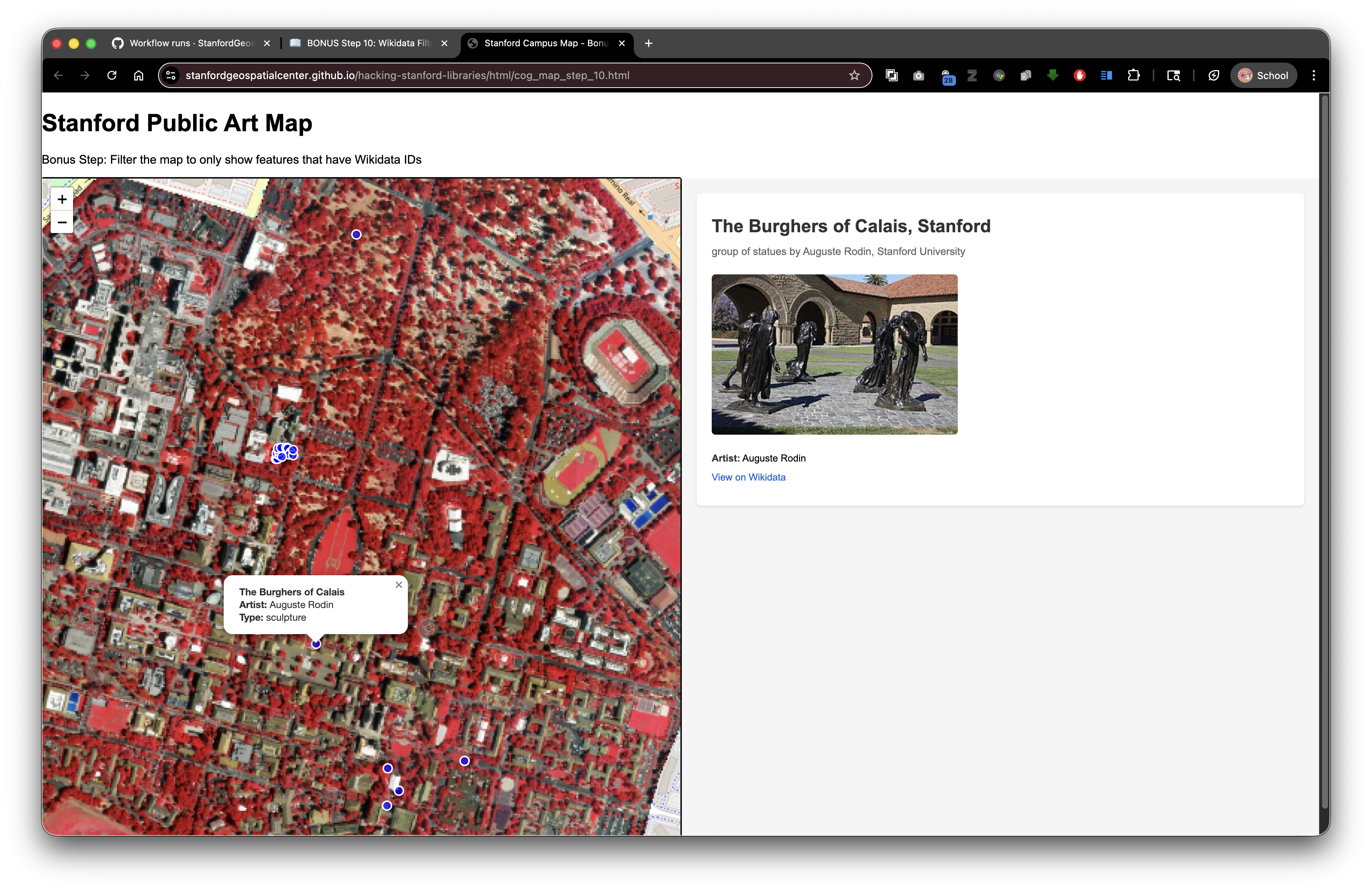
Overview
In this bonus step, we refine the application so it only displays artworks that include a wikidata identifier in the GeoJSON. This keeps the map focused on items that can return rich details from Wikidata.
Goals
- Filter GeoJSON features to only those that have a
wikidataproperty. - Keep the UI responsive when the filtered set is empty.
- Preserve the split-screen experience from earlier steps.
- Maintain compatibility with SDR deployment (relative paths for local assets, absolute URLs for APIs).
Why Filter?
- Reduces visual noise to the records with linked data.
- Avoids user clicks that would return "No Wikidata ID available" messages.
- Highlights the most informative features first.
The Key Changes
1) Update the page title and step label to mark this as the bonus step. 2) Filter features before adding them to the map:
const filteredFeatures = (data.features || []).filter(feature => {
  const props = feature.properties || {};
  return Boolean(props.wikidata);
});
3) Handle empty results gracefully:
if (filteredFeatures.length === 0) {
  document.getElementById('wikidata-panel').innerHTML = '<div id="no-selection">No artworks with Wikidata IDs were found in the dataset.</div>';
  return;
}
4) Build a filtered FeatureCollection and feed it to Leaflet:
const filteredGeojson = {
  type: 'FeatureCollection',
  features: filteredFeatures
};

const artworkLayer = L.geoJSON(filteredGeojson, { ... }).addTo(map);
5) Fit bounds only when data exists to avoid errors:
if (filteredFeatures.length > 0) {
  map.fitBounds(artworkLayer.getBounds());
}
Full HTML (excerpt of the filtering section)
fetch('collection/stanford_public_art.geojson')
  .then(response => response.json())
  .then(data => {
    const filteredFeatures = (data.features || []).filter(feature => {
      const props = feature.properties || {};
      return Boolean(props.wikidata);
    });

    if (filteredFeatures.length === 0) {
      document.getElementById('wikidata-panel').innerHTML = '<div id="no-selection">No artworks with Wikidata IDs were found in the dataset.</div>';
      return;
    }

    const filteredGeojson = {
      type: 'FeatureCollection',
      features: filteredFeatures
    };

    const artworkLayer = L.geoJSON(filteredGeojson, {
      pointToLayer: function(feature, latlng) {
        return L.circleMarker(latlng, {
          radius: 6,
          color: 'white',
          weight: 2,
          fillColor: 'blue',
          fillOpacity: 0.7
        });
      },
      onEachFeature: function(feature, layer) {
        const props = feature.properties || {};
        const title = props.name || 'Artwork';
        const artist = props.artist_name;
        const type = props.artwork_type;

        let popupContent = '<div style="min-width:200px;">';
        popupContent += '<b>' + title + '</b><br>';
        if (artist) popupContent += '<b>Artist:</b> ' + artist + '<br>';
        if (type) popupContent += '<b>Type:</b> ' + type;
        popupContent += '</div>';

        layer.bindPopup(popupContent);

        layer.on('click', function() {
          if (props.wikidata) {
            displayWikidataInfo(props.wikidata);
          } else {
            document.getElementById('wikidata-panel').innerHTML = '<div id="no-selection">No Wikidata ID available for this artwork</div>';
          }
        });
      }
    }).addTo(map);

    if (filteredFeatures.length > 0) {
      map.fitBounds(artworkLayer.getBounds());
    }
  })
  .catch(error => console.error('Error loading GeoJSON:', error));
How It Works
- Filter early: We remove features without
wikidataIDs before creating the Leaflet layer. This guarantees the click handler always has an ID to use. - Guard for empties: If the filtered array is empty, we show a clear message instead of leaving the right panel blank.
- Safe property access:
(data.features || [])prevents errors iffeaturesis missing. - Boolean check:
Boolean(props.wikidata)treats empty strings, null, or undefined as false, ensuring only valid IDs pass through.
SDR Considerations
- Relative paths remain unchanged for local files:
collection/stanford_public_art.geojson,collection/stanford_campus_irg.tif, andstyles_wikidata.css. - Absolute URLs continue for external resources (Leaflet CDNs, Wikidata API, Wikimedia images).
- When deployed to SDR (example DRUID
abc123xyz456), your page loads fromhttps://stacks.stanford.edu/file/druid:abc123xyz456/cog_map_step_10.htmland still fetches the GeoJSON and COG via relative paths inside the same deposit.
Try It
1) Open cog_map_step_10.html in the browser.
2) Confirm only markers with Wikidata IDs appear.
3) Click markers to see the fully populated panel.
4) Test by temporarily removing a wikidata property in the GeoJSON to observe the empty-state message.
Key Takeaways
- Filtering upstream keeps the UI focused and reduces error paths.
- Guarding against empty datasets improves resilience.
- Relative paths plus absolute API calls continue to work seamlessly in SDR deployments.
- Small UX touches (like explicit messages) help users understand data availability.
What You Learned in the Bonus Step
- How to filter GeoJSON features before rendering.
- How to handle empty results gracefully.
- How to keep interactive handlers safe by ensuring required properties exist.
Previous: Step 9: Complete Integration | Bonus: This page